
I used to do this every morning: find an interesting article, highlight the URL, copy it, open Telegram, find the OutloudAI chat, paste, send. It took maybe fifteen seconds total. Not terrible, but fifteen seconds adds up when you're queuing up five articles.
Now there's a better way.
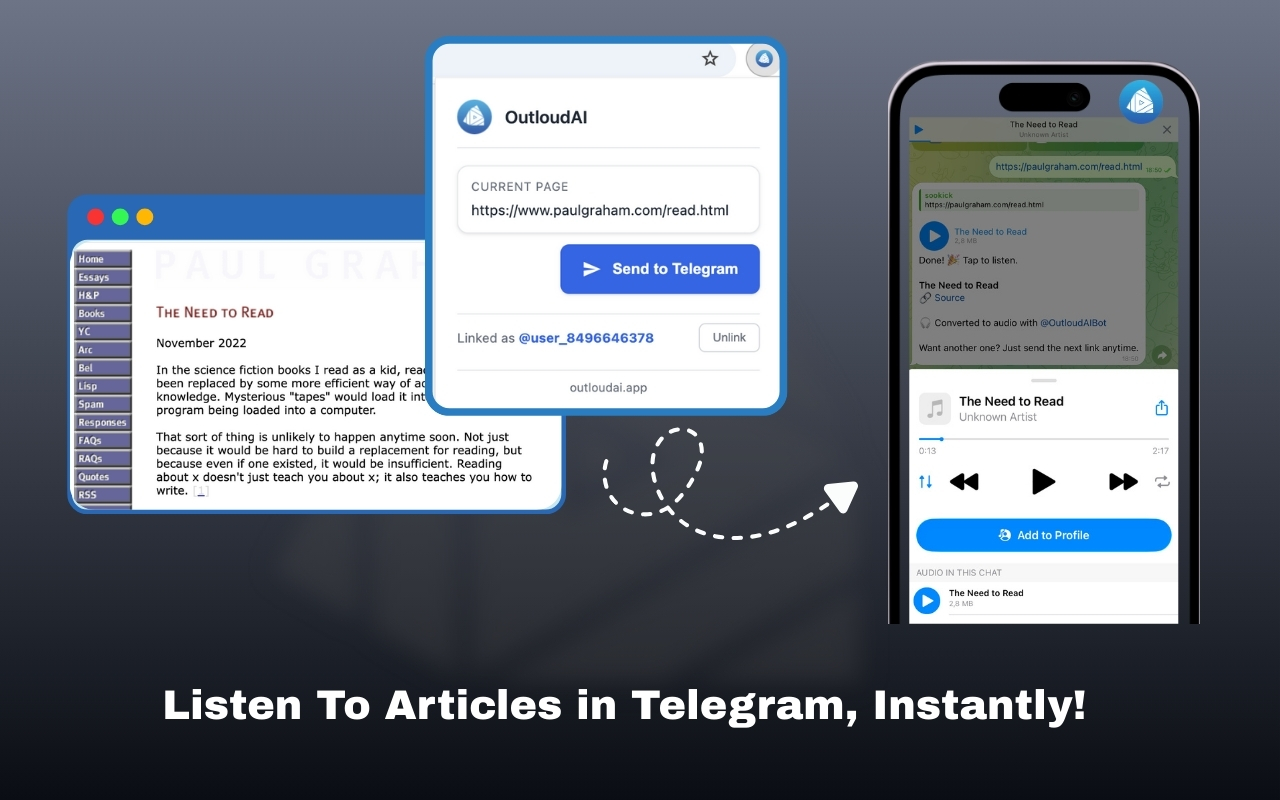
The Chrome extension is live
We just launched the OutloudAI Chrome extension. It does one thing: sends articles to your Telegram instantly, without leaving your browser.
You're reading something interesting. Click the extension icon. Done. The article shows up in your Telegram chat as audio within seconds. No copying, no switching apps, no friction.
The whole workflow shrinks to a single click.
The Telegram linking process
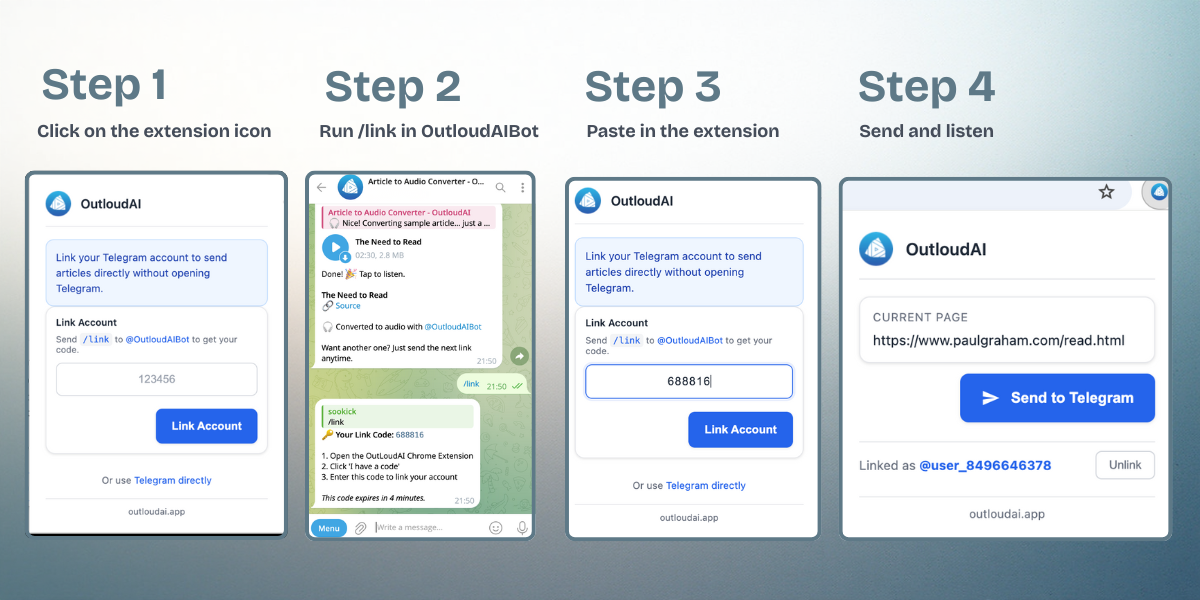
First-time setup connects your Chrome extension to your Telegram account. The extension asks you to run the /link command in @OutloudAIBot in Telegram. The bot generates a unique code for you. Paste the code in the extension pop-up and Done.
After that, everything just works. The extension remembers your account, and clicking the icon sends articles straight to your chat. No re-authentication, no token expiration headaches.
If you ever want to unlink—maybe you're on a shared computer—there's an option in the extension settings.
How it actually works
Install the extension from the Chrome Web Store. First time you open it, you'll link your Telegram account—takes maybe thirty seconds. After that, you're set.
When you're on any article, click the OutloudAI icon in your toolbar. That's it. The extension grabs the URL and sends it to @OutloudAIBot. You get the same thing you always got: clean audio, a summary option, and readable text. Just faster.

There's also a right-click option. See an interesting link in an article? Right-click it, choose "Send to OutloudAI" from the menu. You don't even need to visit the page first.
The extension shows you status updates—a checkmark when it sends successfully, an exclamation point if something goes wrong. Small details, but they make the experience feel solid instead of mysterious.
Why this changes the workflow
The difference seems small until you use it for a week. Then you realize how much mental overhead was hiding in that copy-paste routine.
Before: Find article. Evaluate if it's worth converting. Highlight URL. Copy. Switch to Telegram. Find bot chat. Paste. Send. Return to browser.
Now: Find article. Click icon.
That evaluation step happens faster when the barrier is lower. I'm converting more articles because it takes no effort. Things I might have skipped because "eh, not worth the hassle" now get converted immediately.
My morning routine used to be: browse Hacker News, open interesting links in tabs, then batch-convert them all by copying URLs into Telegram. Now I just click the icon as I go. The articles are already waiting in Telegram by the time I'm ready to listen.
What it handles well
The extension works with basically any article on the web. News sites, Medium, Substack, personal blogs, documentation pages. If it has a URL and it's publicly accessible, the extension sends it.
It's smart about context menus too. Right-click on a link and the menu shows "Send to OutloudAI" for that specific link. Right-click on the page itself and it sends the current page URL. The extension figures out what you meant.
The badge system is subtle but useful. A little checkmark appears on the icon when something sends successfully. If you're not linked to Telegram yet, it shows a notification. Error? You'll see an exclamation point. You always know what's happening without opening the popup.
Getting started
If you use Chrome and you already use OutloudAI, install the extension. Link your Telegram account. Start clicking.
If you haven't tried OutloudAI yet, this is probably the easiest entry point. Install the extension, link Telegram, click it on any article. See what happens. If you like listening to articles instead of reading them, you'll use this constantly.
The goal was always to make audio conversion effortless. URLs in Telegram worked. This works better.
One click. That's the whole story.